


Wyndham Hotels & Resorts
4.719.42K Reviews
App Specs
- Version
- 5.15.0
- Updated On
- License
- Free
- Downloads
- 1,000,000+
- Developer
- Wyndham Hotel Group
- Categories
- Travel & Local
- Platform
- Android, iOS
Screenshots

 Analysis by AppCompare
When I judge a hotel-booking app, I look beyond how quickly it can find a room. I also want to know whether I can read the choices, compare them without losing my place, and make a booking when I’m tired, distracted, or travelling with someone who needs a different pace. Wyndham Hotels & Resorts is a free travel app from Wyndham Hotel Group, built around booking stays at its hotels. It suits travellers who already look for Wyndham properties, but the way it supports different needs deserves as much attention as the booking flow.
First Impressions and Navigating the App
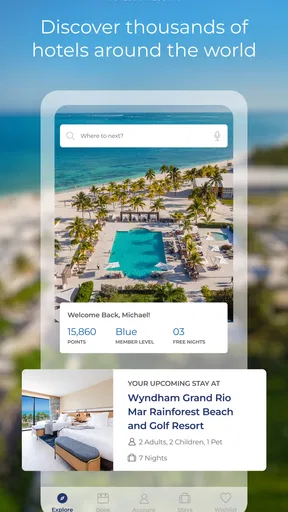
Right off the bat, the Wyndham Hotels & Resorts app greets you with a sleek and user-friendly interface. It's like having a personal concierge in your pocket. The home screen is clean, and everything you need is just a tap away. I was pleasantly surprised by how intuitive the navigation is. No need to fumble around trying to find what you need—everything is organized into neat categories.
The app offers a quick sign-in option, which is great for those who are always on the go. Once you're in, the dashboard gives you a quick overview of your current bookings, available rewards, and any special offers. It's like they took all the hassle out of planning a trip.
Readability and choosing a hotel
For someone comparing several stays, the useful question is not simply whether there are plenty of results, but whether the details help narrow them down. The booking flow described here gives travellers filters for location, price, and amenities, alongside a map view. That combination can make the first pass easier: use the map to judge where a property sits, then use the listing details to decide whether it fits the trip. I would still slow down before paying, because a quick glance at a hotel name or photo is not a substitute for checking the room and booking terms.
Hotel listings can place a lot of information on one screen. If small text or dense layouts are difficult for you to read, take time to inspect the details before committing rather than relying on a fast scroll. The app’s clear categories may help with orientation, but readability is personal: what feels tidy on one phone can feel crowded on another. I would also avoid making a final choice based only on guest ratings. They are a useful signal, not a guarantee that a property will suit your particular needs.
Booking Made Easy
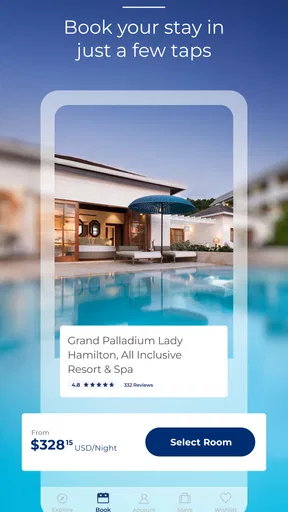
One of the standout features has to be the booking process. Using the app to book a room is as simple as ordering a pizza. Seriously, it’s a breeze. You can filter hotels based on location, price, amenities, and more. The app even offers a map view to help you pick the perfect spot.
Once you select a hotel, you’re greeted with a detailed description, complete with photos and reviews. This really helps to make an informed decision. I love that you can see guest ratings right there on the app, so you know exactly what you’re getting into.
Worth Reading Before You Choose

EA SPORTS FC Mobile 26 Is a Bigger Football Game, but It Takes Time

Flipboard Shows What News Apps Must Do Beyond the Feed

Switching to Android Auto Means Rethinking Your Driving Routine

Google Calendar Makes a Crowded Week Easier to Manage

Ludo King Makes the Most of the Minutes Between Plans

Baby Panda World Brings Quick Play to Modern Phones, but Its Game Library Feels Busy
Motor and sensory considerations
Booking a room involves more than reading: you may need to enter travel dates, move through results, choose a property, and confirm the reservation. A straightforward path can be welcome if you have limited dexterity or find repeated navigation tiring. In practice, I’d make the booking when I have a stable connection and enough time to check each choice, rather than trying to complete it while walking through a station or juggling luggage. That small change reduces the chance of tapping the wrong date or selecting a room before I’ve reviewed the details.
For people who are sensitive to visual clutter, alerts, or busy screens, I’d treat the app as a planning tool to use in a calm moment, then keep the essential reservation information easy to retrieve for the trip. The app’s booking and account functions make it useful for organising a stay, but each traveller’s sensory needs differ. If you rely on a particular phone setting or assistive tool, it is sensible to check that your own device setup works comfortably before depending on the app during a time-critical journey.
Situational access: planning around the journey
A realistic example: I’m arriving in an unfamiliar city late in the day, and the original plan has fallen through. I can use the location filter and map to look for a Wyndham property near the area I need, compare the listed amenities, and make a reservation without starting the search from scratch. If I have booked there before, the saved booking history can also make it easier to return to a familiar choice. The practical benefit is less about finding a perfect hotel instantly and more about keeping the essential decisions together while plans change.
That said, a map is only one way to judge a location. A pin does not tell me whether the route from the station feels manageable, whether the surrounding area suits my plans, or whether a listed amenity meets a specific access need. I’d use the map to shortlist and then inspect the property information carefully. If a particular room arrangement or facility matters to you, contact the hotel to confirm it rather than assuming a general listing description covers your exact requirement.
Exploring Rewards and Offers
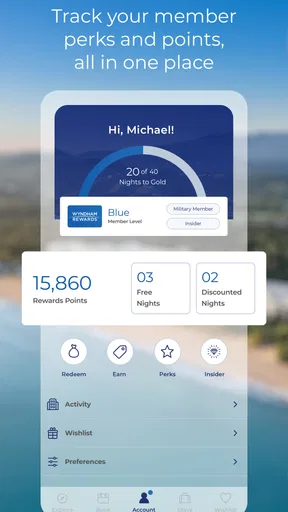
If you're a member of the Wyndham Rewards program, you’re in for a treat. The app makes it incredibly easy to track your points and redeem them for free nights. It’s like having a treasure chest of travel goodies at your fingertips.
Not a member yet? No worries. Signing up through the app is super quick, and you’ll immediately start earning points on your bookings. The app also notifies you of exclusive offers and discounts, which is perfect for those spontaneous weekend getaways.
Making rewards useful rather than distracting
Rewards can be helpful when you already expect to stay with the same hotel group, but I wouldn’t let points decide a trip on their own. A slightly less convenient location or a room that does not fit your needs is not automatically a better choice because it earns rewards. I’d compare the total stay and the practical details first, then treat points or offers as an extra reason to choose a suitable property. That approach is especially useful if your dates are fixed or you are travelling with family, where location and room requirements may matter more than a deal.
For an occasional traveller, the app can still be useful without making rewards the centre of the experience. You can focus on finding and managing a stay, while frequent Wyndham guests may get more value from keeping their points and booking history in one place. If you prefer to compare every available hotel brand in a city, a broad travel-search service may be a better starting point; this app is most compelling when you are actively considering Wyndham properties.
In-App Features and Extras
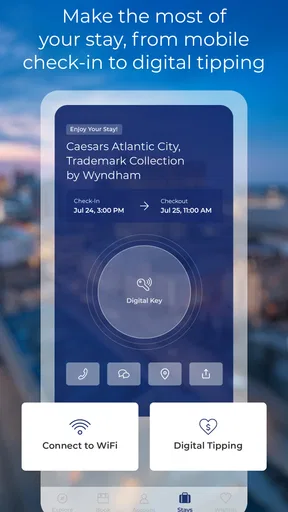
Beyond booking and rewards, the app offers a variety of features that make travel planning a joy rather than a chore. You can check in and check out directly from the app, which means no more waiting in line at the front desk. Plus, the app saves all your booking history, so re-booking a favorite hotel is just a couple of taps away.
Need to modify a booking? The app has got you covered. It’s straightforward to make changes to your reservations, whether it's adjusting dates or upgrading your room. This level of flexibility is a huge plus in my book.
Remaining barriers and practical trade-offs
Convenient in-app management does not remove the need to understand the reservation you are making. Before confirming, I would check the dates, room choice, and conditions carefully; after a change, I’d return to the booking details to make sure the revised plan is clear. That habit matters when a trip has multiple stops or another person is coordinating transport, because a small date mistake can ripple into the rest of the itinerary.
There is also a trade-off in using a brand-focused app. Its search is relevant when Wyndham is already on your shortlist, but it is not the same as surveying the whole hotel market. If your priority is the widest possible range of independent properties or a side-by-side view across many chains, start with a general booking service and use this app when you want to explore Wyndham options or manage a Wyndham reservation. I see that as a matter of choosing the right tool, not a flaw in the app’s purpose.
The app is rated for Everyone and has a 4.6 average from around 64,000 ratings, with more than a million installs. It first appeared in 2013, and version 5.14.1 is listed for devices running Android 9 or later. Those details make it easy to identify the Android app, but they do not tell me whether it is the right fit for every traveller. I’d decide based on whether its hotel selection, booking tools, and on-the-go workflow match the way I plan trips.
Final Thoughts
All in all, the Wyndham Hotels & Resorts app is a must-have for anyone who loves to travel. It takes the stress out of booking and managing hotel stays, making the entire process almost too easy. With its user-friendly interface, extensive rewards program, and handy features, it’s a travel companion I didn’t know I needed.
If you haven’t checked it out yet, give it a try. Whether you’re a frequent traveler or just planning a quick getaway, this app is bound to make your life easier. Happy travels!
Who I’d recommend it to
I’d recommend it to people who often choose Wyndham hotels, want to keep reservations and rewards together, or need a direct way to handle a stay they have already booked. It can also suit someone planning a simple weekend trip who values a focused search more than browsing every hotel brand at once. For a traveller who depends on specific room arrangements, step-free routes, or other individual access needs, I’d use it to find candidates but confirm those requirements with the property before booking.
I’d skip it as my only search tool if I were choosing a destination first and had no preference about hotel groups. In that situation, a wider comparison service gives a better starting point; once a Wyndham option looks promising, this app becomes more relevant. My overall view is that it offers a convenient, brand-specific way to plan and manage a stay, while inclusive use still depends on checking the details that matter to you. If you can comfortably navigate its screens and its hotel options match your plans, it is a practical travel companion; if not, a broader service or direct contact with the hotel may be the better route.
Pros
- User-friendly interface for easy bookings.
- Comprehensive loyalty program benefits.
- Wide range of hotel options globally.
- Real-time booking updates and confirmations.
- Secure payment options with multiple methods.
Cons
- Occasional app crashes during peak times.
- Limited offline functionality.
- Some users report slow loading times.
- Inconsistent customer service responses.
- Missing detailed local area info.
FAQs for Wyndham Hotels & Resorts
What features does the Wyndham Hotels & Resorts app offer?
The Wyndham Hotels & Resorts app provides users with a seamless booking experience, allowing them to search for hotels, view room rates, and make reservations directly from their device. It also includes features such as mobile check-in and check-out, exclusive member discounts, and the ability to manage your Wyndham Rewards account.
Is the Wyndham Hotels & Resorts app free to download and use?
Yes, the Wyndham Hotels & Resorts app is free to download on both Android and iOS platforms. Users can easily find it on the Google Play Store or Apple App Store. While the app itself is free, booking a room will involve charges based on the chosen accommodations.
Can I earn and redeem Wyndham Rewards points through the app?
Absolutely! The app allows you to earn Wyndham Rewards points for every qualifying stay. You can also redeem points for free nights, gift cards, or other rewards. The app makes it easy to track your points balance and view available redemption options right from your mobile device.
Is it safe to use the Wyndham Hotels & Resorts app for booking?
The app prioritizes user security by employing encryption and secure payment gateways to protect your personal and financial information. Additionally, it follows industry-standard practices to ensure data safety. Users can feel confident that their transactions and personal details are handled securely.
Does the app offer customer support for booking or technical issues?
Yes, the Wyndham Hotels & Resorts app includes a customer support feature, providing users with access to assistance for booking or technical issues. You can contact support directly through the app via chat or phone, ensuring that help is readily available whenever you need it.


